RTStand HIL Test and Simulation features
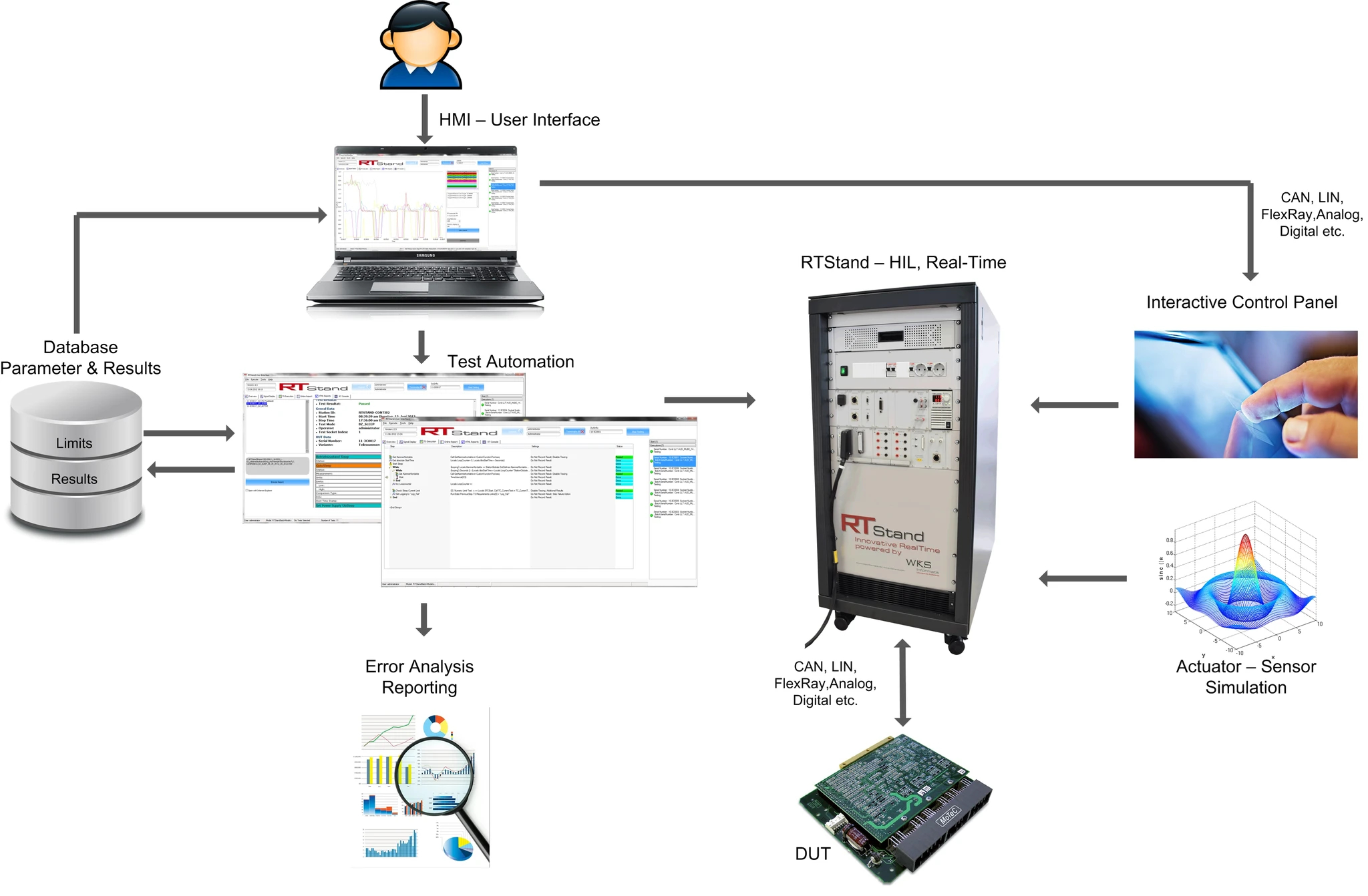
RTStand focuses on customer productivity, which reduces testing and production costs. Therefore, RTStand offers following modular and scalable components:
User Interface
Database Parameter & Results
Test Automation
Hardware Test Platform
Interactive Control Panel
Actuator – Sensor Simulation
Error Analysis Reporting
A set of standard functionality, such as test overview, online reporting and report visualization
Customizable panels, for individual customer needs
User management (administrator, operator)
Database connectivity
Editor option for test sequences
For a detailed overview of how the User Interface works and which customization functions it offers, please read out User Guide.
Screenshots and a short overview can be found on the USER INTERFACE page.
DOWNLOAD NOW the RTStand User Interface and try the innovative user experience!
Database Parameter & Results
Measurement data logging
Limit loading
Variant handling
Measurement data visualization and analysis tool
Support of sequential and parallel testing
Support of several DUTs in parallel
Custom step type library for over 50 devices
Climate chamber control
Reporting in various formats (*.txt, *.csv, *.html, *.xml, *.atml and other on request)
Hardware Test Platform
RTStand Automotive Test Platform – Support of CAN, LIN, FlexRay, DMM, AIO, DIO etc.
RTStand NI Star Test Platform- Support of National Instruments Scalable Test Architecture.
RTStand Production Test Platform – Support of database connectivity, limit loading, traceability tools etc.
RTStand LV 124 Test Platform – Support of LV 124, ISO16750-2, VW 80000, BMW GS 95024-2-1, Renault 36-00-808.
Interactive Control Panel
Interactive control of the test hardware, including actuator and sensor simulation, even at runtime
Intuitive display
Editable at runtime (measurement channel selection)
Integrable in the user interface or stand-alone
Actuator – Sensor Simulation
Can be used to interact with models from a variety of modeling environments and programming languages
Can run compiled models created in any supported modeling environment as well as uncompiled models (.mdl files) created using MathWorks Simulink® software.
Error Analysis Reporting
Innovative “3 Click” measurement data mining method, for a quick and easy error analysis
Industry standard format TDMS software.
Fieldbus measurement data analyzer
TDMS measurement data analyzer
Report visualization integrated in the user interface
For more details, get in touch with WKS Informatik!